
Starlink Mini 2 vs Mini 1: Should You Upgrade, Wait, or Buy the Mini 1 Now?
Starlink just announced the Mini 2, and the questions are already rolling in. Should I upgrade? Should I wait? Should I grab a Mini 1 while it's $149?

Some links in this post are affiliate links. If you buy through them, we may earn a small commission at no extra cost to you.
Starlink just announced the Mini 2, and the questions are already rolling in. Should I upgrade? Should I wait? Should I grab a Mini 1 while it's $149?
We've had our Starlink Mini since it was released in 2024, using it at camp and while driving. So I spent the day after the announcement digging into what actually changed, who it's built for, and what it really costs.
Quick Pick: Already own a Mini 1? Wait and see. Need a Starlink now? The Mini 1 at $149 is a great deal. Want a grab-and-go dish and can wait? Hold off for the standalone Mini 2 price.
What actually changed?
Mini 2 puts the battery inside the dish. Almost everything else follows from that.
Size and build
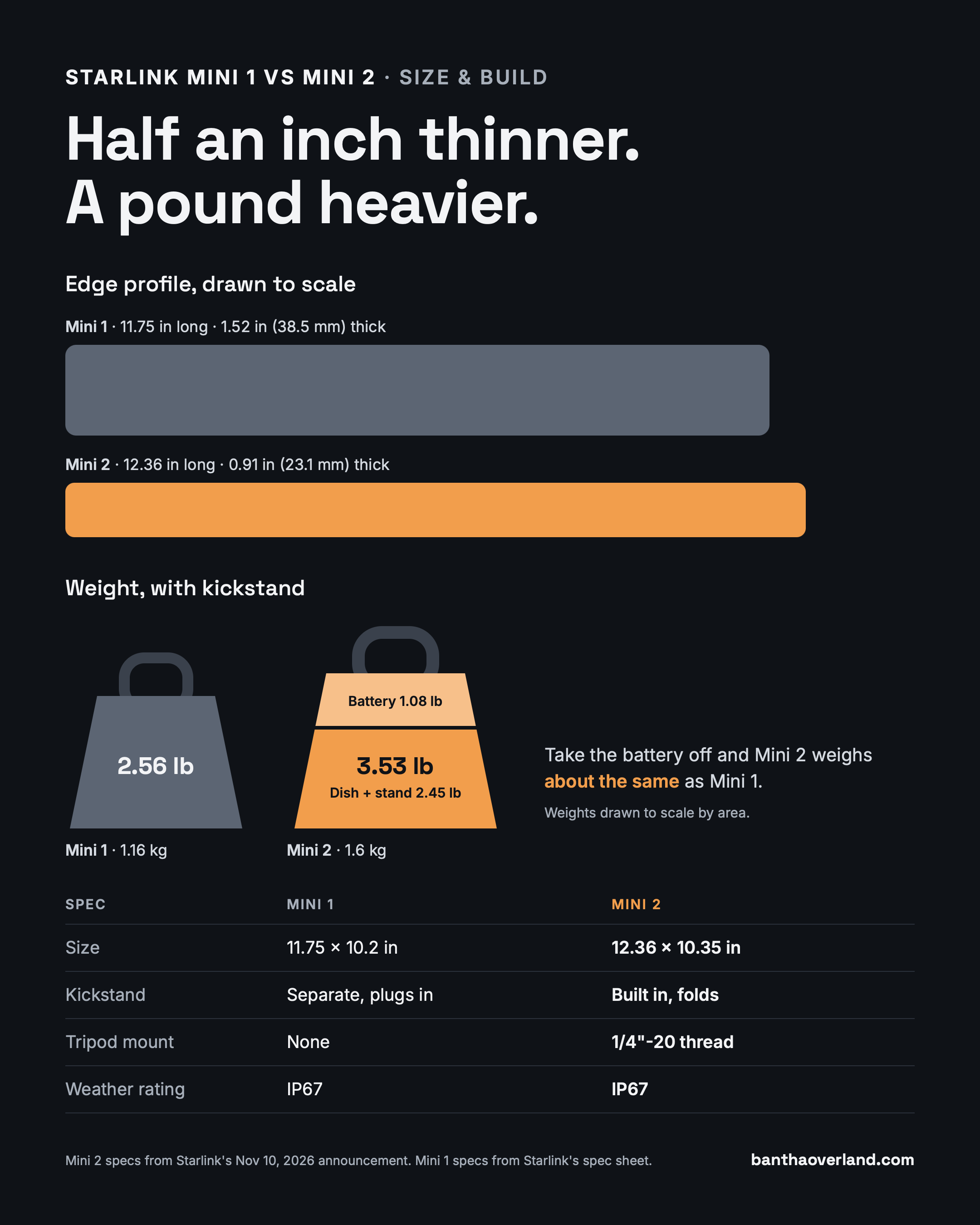
Mini 2 is 0.91 in thick, down from 1.52 in on the Mini 1. It's also about a pound heavier: 3.53 lb vs 2.56 lb. Take the battery off, though, and it weighs about the same as the Mini 1.
The kickstand is now built in and folds flat. There's also a standard 1/4"-20 thread, so any camera tripod works without an adapter. Yes, we've finally gotten a threaded mounting point so my Mini 1 tripod adapter isn't needed for this one. It keeps the same IP67 weather rating.
Power
This is the big one. Mini 2 has a 71 Wh swappable battery rated for up to 4.5 hours. It charges over standard USB-C at 60W, and the battery can charge your phone too.
With the Mini 1, getting online meant packing the dish, the kickstand, a power station or 100W USB-C power bank, and a barrel cable - extra equipment and cost. With the Mini 2, it's just the dish assuming the battery is charged.
There's also a physical power button now. That sounds small, but it fits how we already use Starlink at camp: our Internet Hour. Turn it on, check the weather, download maps, turn it off. Having a power button really helps using Starlink more intentionally and still enjoy being disconnected.
Starlink hasn't published Mini 2's power draw. The Mini 1 averages 25–40W. Back-of-the-napkin math (battery spec 71 Wh ÷ 4.5 hrs) puts the Mini 2 around 16W, but treat that as a best case.
Connectivity
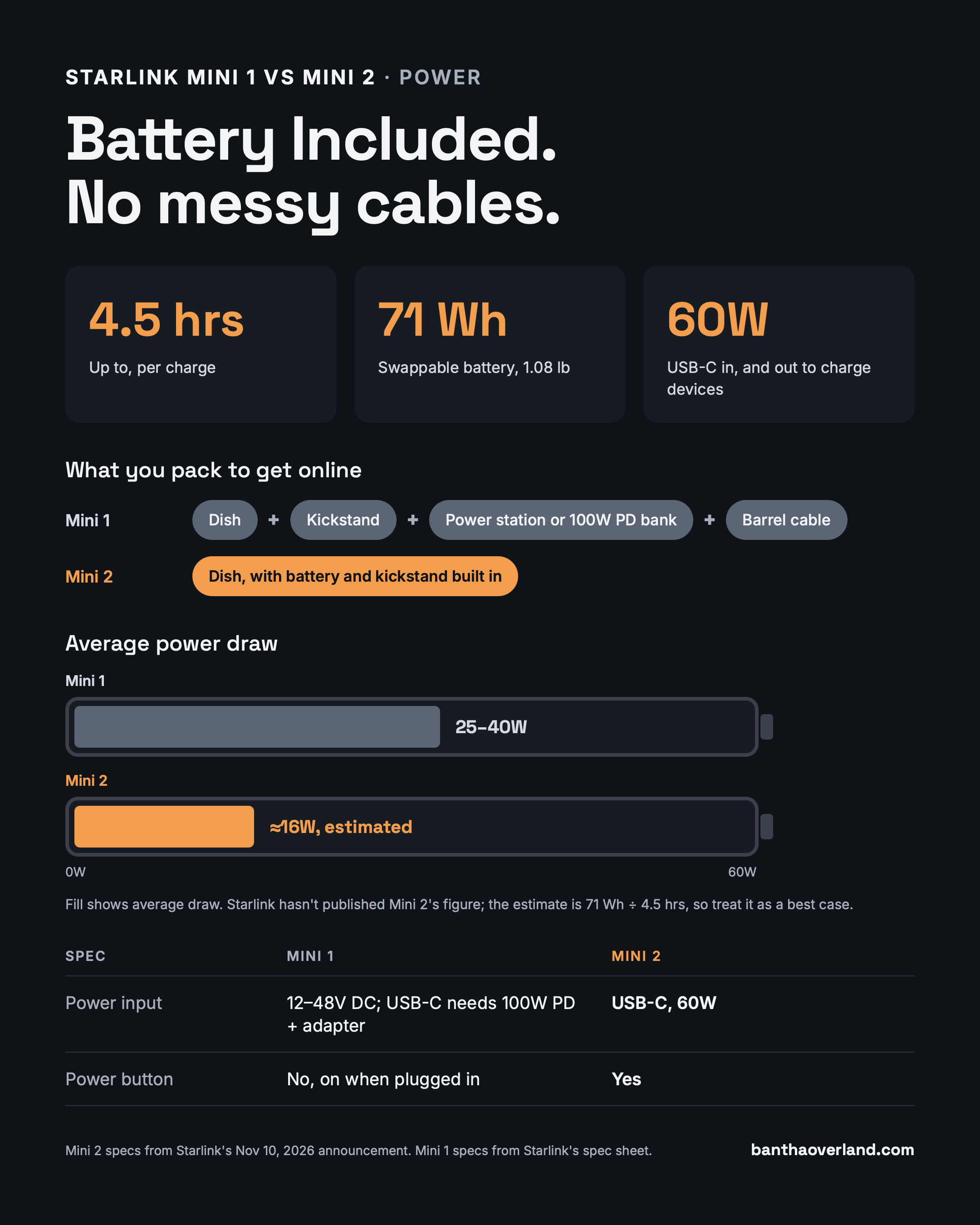
Wi-Fi moves from Wi-Fi 5 (about 1,200 sq ft) to Wi-Fi 6 (up to 1,800 sq ft). That's handy, providing more coverage and faster device to router speeds.
The field of view is listed as 55°, vs 110° on the Mini 1. TBD if that matters. Probably not, but I'll test it under trees before I say for sure.
Starlink hasn't published speeds. A leak suggests uploads may be slower, which I cover below.
Who is the Mini 2 for?
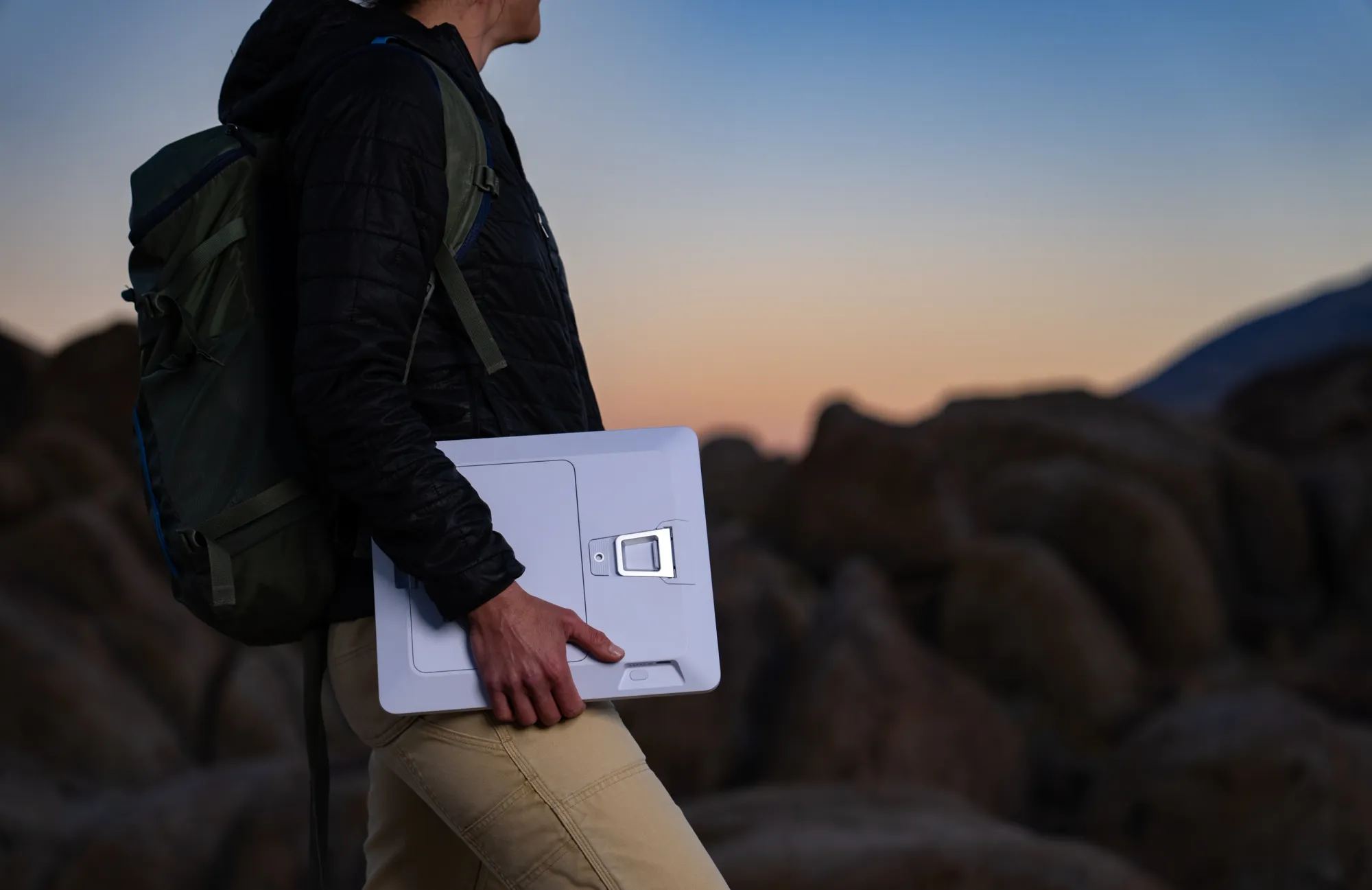
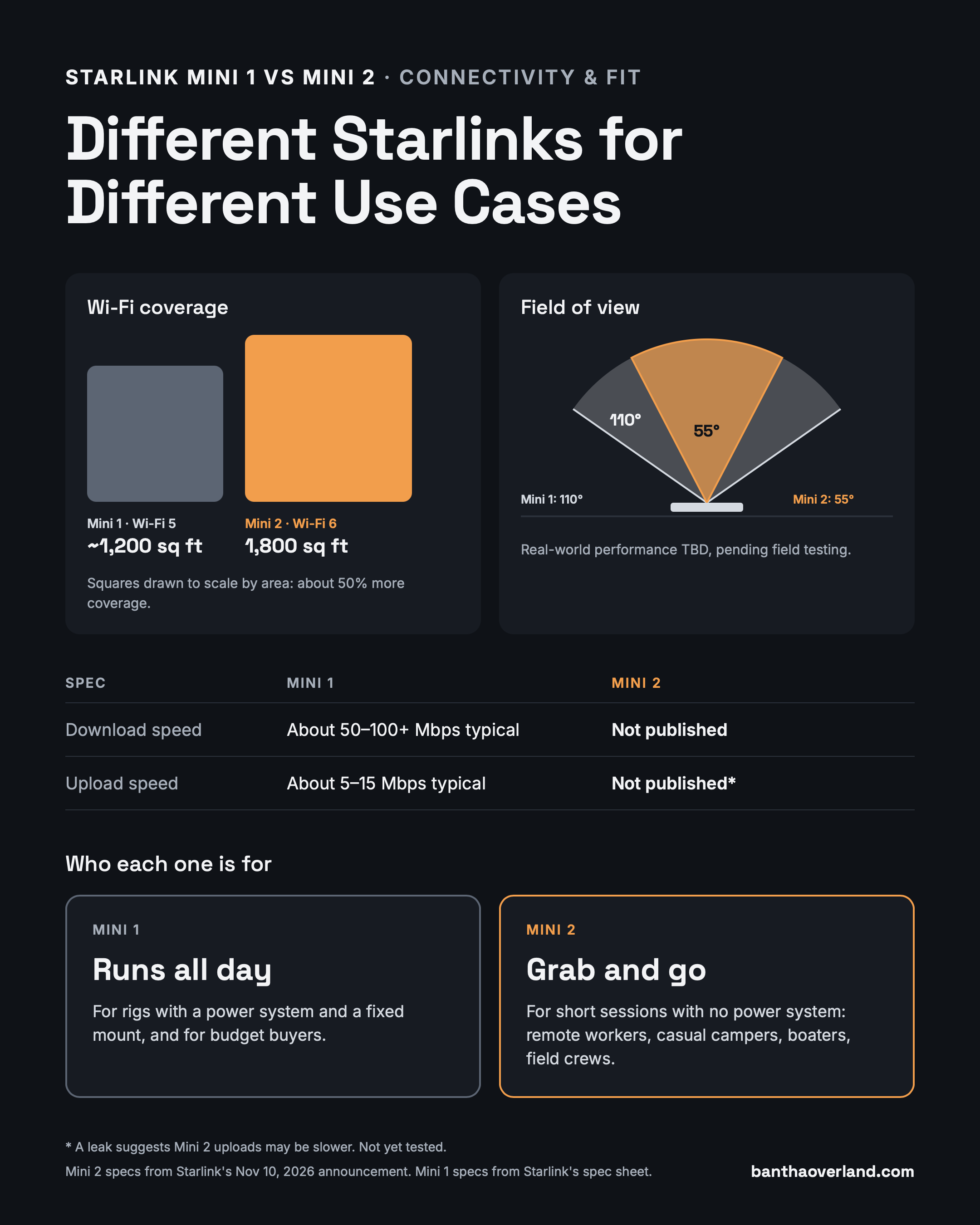
Mini 2 is built for short sessions away from a power system. You carry it, turn it on with a purpose, and put it away. I'm thinking of it as a "better mobile hotspot" with better coverage than a traditional cellular hotspot.
- Remote workers who want to work a few hours from a trailhead or a picnic table.
- Casual campers without a power station or who don't want a mess of wiring, who just want to check the weather and messages.
- Field crews who hike in and need connectivity for their work and safety - ex Search and Rescue.
Who it isn't for: rigs like ours. Our Starlink Mini 1 is already mounted on the top of our vehicle and wired into its power and solar system. It works great and there's no large benefit to upgrading.
What does it cost? (It's confusing.)
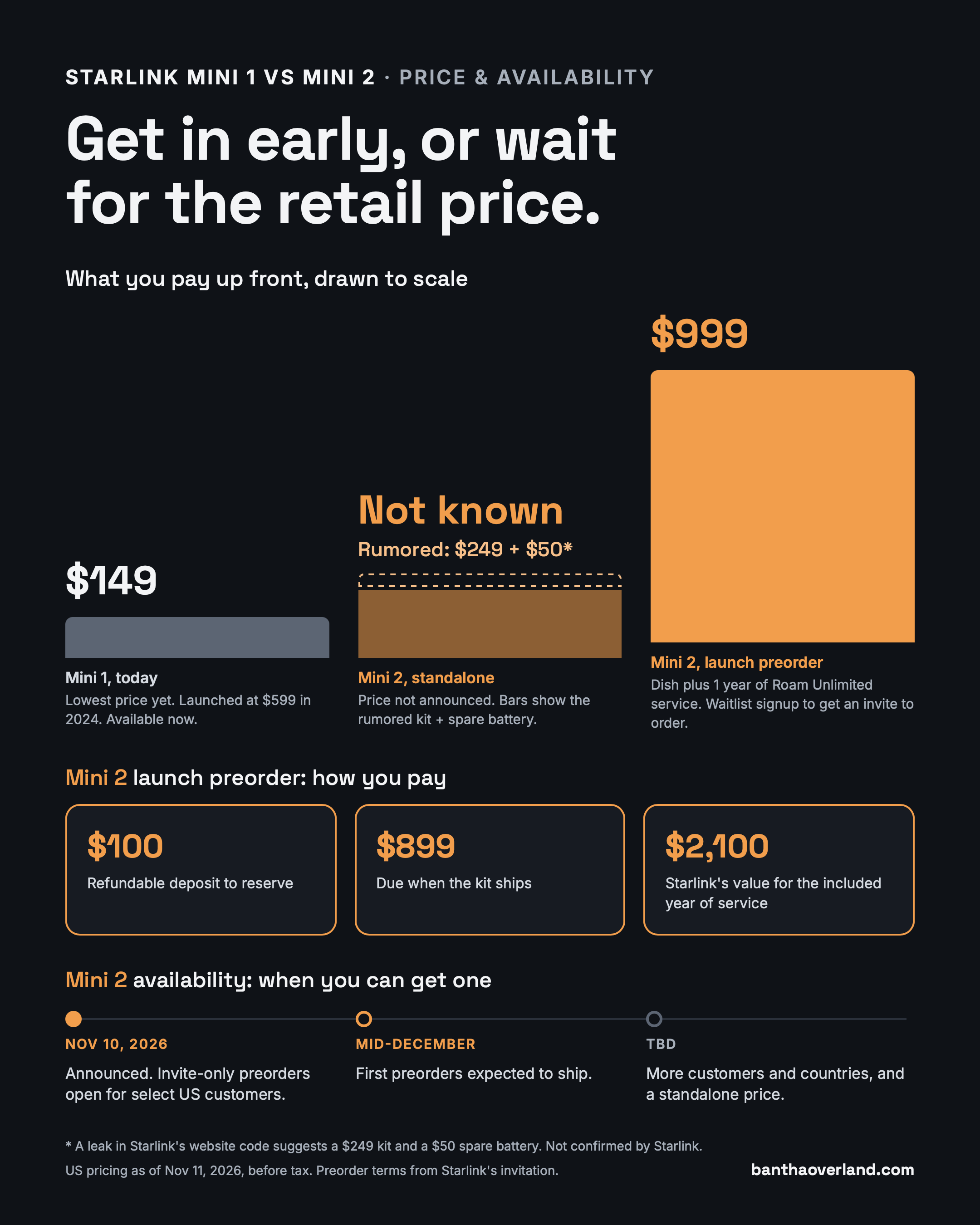
Right now, the only way to get a Mini 2 is a $999 invite-only preorder that includes a year of service. Here's how the three prices compare:
- Mini 1: $149 today, its lowest price yet. It launched at $599 in 2024, and it's available now.
- Mini 2 launch preorder: $999 plus tax, including 12 months of Roam Unlimited, which Starlink values at $2,100. You put down a $100 refundable deposit and pay $899 when it ships, estimated for mid-December. Sign up for the waitlist to get an invite to order.
- Mini 2 standalone: not announced yet. A leak in Starlink's website code suggests a $249 kit and a $50 spare battery, but Starlink hasn't confirmed either.
Recommendation: The $999 bundle only makes sense if you'll use Starlink heavily every month of the year. If you travel seasonally, you're paying for months your dish sits in a drawer. Most people should wait for the standalone price.
What we don't know yet (and what I'll test)
The specs that matter most in the field aren't published yet. Here's what I'll test once mine arrives:
- Upload speed. A firmware leak suggests the Mini 2 transmits far less of the time than the Mini 1 (11% vs 75%). If you join live video meetings or take calls from camp, this is the one to watch. Can I trust it as my primary means of communication in remote areas?
- Real battery life. "Up to 4.5 hours" is a best case. I want to know what it does in summer heat, a cold morning, and a full day of real use. Does keeping it plugged in still make sense to prevent disconnection because of a dead battery?
- Field of view. Does the listed 55° actually see less sky than the Mini 1? And does Starlink Beam Switching still work as well to avoid obstructions like trees? I'll test both under the same trees.
- Mounted vs portable. How fast can it go from the roof or dashboard to a picnic table and back? More on that below...
Want the results? Sign up and I'll email you my Mini 2 field test results, plus first dibs on the Mini 2 mounts I'll be prototyping. You'll also get our free Starlink Field Guide right away.
Got something you want me to test? Email me and I'll add it to the list.
Mounted and portable: the real-world question
Most of us won't pick between a roof mount and grab-and-go. We'll want both from the same Starlink. We'll still want to mount a Starlink in or on our vehicles but likely need to move it somewhere else at times when we're camping under trees. Because where we want to camp and where there's a clear view of the sky often aren't the same location.
That raises a few questions I'll be looking at:
- Quick release. How do you pop off a roof mount in seconds, without tools? Will Starlink sell any new mounts for it? Or will I make my own?
- The battery. It swaps from the back, so a good mount should let you change it without removing the dish. Will that require new mount designs?
- The USB-C port and cable. It's on the side, where a bracket could easily block it. And there's a new weatherproof USB-C cable. Will it work with other devices or will the extra weatherproofing get in the way?
What this means for your gear
Mini 1 mounts and accessories won't fit the Mini 2. It's a different size and shape. But if you're keeping your Mini 1, your gear is still the right gear, including our Mini 1 mounting adapters, cable wraps, and cable caps.
For the Mini 2, any compact camera tripod works thanks to the built-in thread. Check out our tripod guide for my picks.
So, should you upgrade?
It depends on how you use Starlink today. Here's where I'd land:
- You own a Mini 1 and have a power system: Wait and see. Your setup already works, and there's no reason to pay launch pricing before real-world tests.
- You own a Mini 1 but wish it went everywhere: Wait for the standalone price and my test results.
- You don't own a Starlink and need one now: Get the Mini 1 at $149, plus a 12V setup or a 100W USB-C power bank.
- You don't own one and can wait: Wait for the standalone Mini 2. Grab-and-go is exactly what it's built for.
- You'll use Roam Unlimited every month of the year anyway: The $999 bundle can make sense, if you get an invite.
Final thoughts
The Mini 2 isn't a must-have upgrade. It's a different kind of Starlink: a "better mobile hotspot" that's portable enough to carry with you, turn on with a purpose, and put away when you're done.
I'll share everything I learn once mine shows up in December. If you want my field test results and first dibs on Mini 2 mounts, sign up below. You'll get our free Starlink Field Guide right away.
See you out there,
-Adam